PixToPrompt / The 1980s collection
1980s AI photos. Your own eighties moment.
Upload a photo, choose an eighties look and make it your own. Or copy an original 1980s photo prompt for ChatGPT.
One reference photo. One credit per generation.
Sign in to upload and generate. You can copy the prompts below without an account.
JPG, PNG or WebP · Up to 10 MB. For couples or families, use one photo containing everyone.
Edit the prompt (optional)
464/1,000 characters · Facial likeness can vary.
Use photos you have permission to edit. Your upload is sent to our storage and AI provider when you generate.
Check eyes, expression and facial proportions side by side.

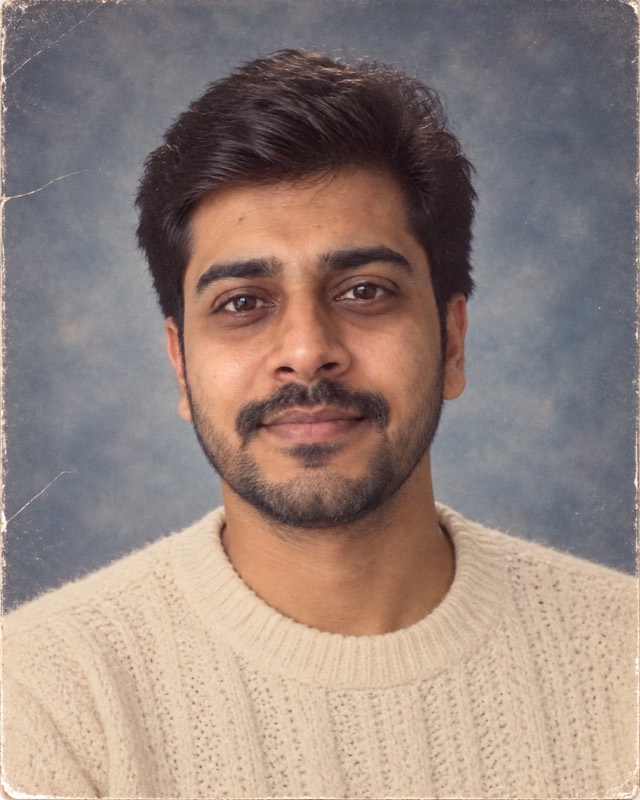
Example made with this tool from an AI-generated fictional person — not a real customer photo. Your own result will replace it.
Explore the copy-ready promptsFind a look. Keep the prompt.
A 1980s photo prompt is the block of text you hand an image model along with your own photograph. The prompt does two jobs at once: it describes the decade you want, and it tells the model which parts of the picture must survive the edit. This page covers the second job, which is where most attempts come apart, and what to do once the model you are using stops letting you try.
Copy any of these without signing in. In ChatGPT or another image editor, attach your own photo before pasting the text. Results vary by model.
Soft light, a painted backdrop and a favorite knit sweater.
Edit the uploaded photo into a realistic photograph from 1985. Preserve each person's recognizable facial features, apparent age, skin tone and expression. Keep natural skin texture, subtle film grain and slightly faded print colors. No modern devices, logos, text or watermarks. One person, head and shoulders, softly mottled blue-gray studio backdrop, cream knitwear, gently feathered hair adapted to their existing hair, soft frontal light. Keep the eyes sharp.
Use this look with my photoA relaxed street portrait with the warmth of a film print.
Edit the uploaded photo into a realistic photograph from 1985. Preserve each person's recognizable facial features, apparent age, skin tone and expression. Keep natural skin texture, subtle film grain and slightly faded print colors. No modern devices, logos, text or watermarks. One person in a denim jacket over a plain shirt, waist-up portrait by a brick wall, late-afternoon sunlight, muted 35mm color-negative tones and a relaxed pose. Avoid contemporary street signs and cars.
Use this look with my photoA lived-in room, soft flash and everyone together.
Edit the uploaded photo into a realistic photograph from 1985. Preserve each person's recognizable facial features, apparent age, skin tone and expression. Keep natural skin texture, subtle film grain and slightly faded print colors. No modern devices, logos, text or watermarks. Keep every person, their relative positions and distinct faces. A candid family snapshot in a wood-paneled living room with a patterned sofa, period knitwear, soft direct flash and an imperfect handheld composition. No additional people.
Use this look with my photoWhat makes a photo read as 1985 rather than just old
Vintage is not a decade. A sepia wash and some grain will read as generic nostalgia, and viewers who lived through the period will place it anywhere between 1955 and 1999. A convincing eighties photograph is built from four specific things, and a prompt that names all four beats a prompt that asks for a vintage feel three times over.
- Wardrobe
- Structured shoulders, chunky knitwear, high-waisted denim, wide collars. Clothing carries more of the decade than any filter, because it is the thing the model can change without touching a face.
- Hair
- Volume and soft feathering rather than a flat modern cut. Ask for volume adapted to the hair already in your photo instead of a wholesale restyle.
- Light and setting
- A mottled painted backdrop and soft frontal key light for a studio sitting; harsh direct on-camera flash for a snapshot at home. These two are not interchangeable and mixing them is what makes a result feel staged.
- Print finish
- Slightly faded colour, restrained grain, and the softness of a print rather than a screen. Keep it gentle; heavy grain buries the eyes and skin texture that make a face readable.
Running a 1980s prompt in ChatGPT
Attach your photograph before you paste the prompt. A model that receives the text first will often generate an invented person from the description, and you will spend an attempt on a stranger. With the image in place, paste the prompt unchanged the first time so you can see what the wording does on its own.
If something is wrong, ask for one correction at a time. Requesting a different backdrop, less grain and a longer jacket in a single message gives the model permission to rebuild the whole frame, and the face usually moves with it. One change per attempt is slower on paper and faster in practice.
When the free image allowance runs out
This is the wall most people hit. Free ChatGPT accounts are widely reported to allow roughly two to three image generations per rolling 24-hour window, and the allowance is rolling rather than resetting at midnight: an image made at 9:15 this morning frees that slot at 9:15 tomorrow. OpenAI does not publish fixed per-plan figures, and the numbers move with demand, so treat any specific count as a guide rather than a guarantee.
Two or three attempts is not many for an edit that usually needs several. Couples and group photos routinely need more, and a first attempt that comes back with the wrong decade has already cost you a third of the day's budget.
There are three honest responses. Wait for the rolling window to free a slot. Spend a paid plan, which raises the ceiling substantially. Or make the attempts you have count by pasting a prompt that already names the wardrobe, the light and the print finish, instead of discovering those through trial and error. The prompts on this page are written for the third option, and the editor above runs the same instructions without using up a ChatGPT slot.
Four wordings that spoil a retro edit
- Stacking every change into one request
- New hair, new clothes, new setting, new expression and a new pose in one prompt leaves nothing anchored. Change the styling and hold the pose, or change the pose and hold the styling.
- Borrowing modern quality words
- Asking for 8K, HDR or ultra-sharp contradicts the thing you are trying to make. A 1985 print was none of those, and the model will resolve the conflict by producing a clean modern photograph with a warm tint.
- Saying vintage and stopping
- Vintage, retro and old-school do not specify a decade. Name the garment and the backdrop instead and the decade arrives on its own.
- Leaving identity unstated
- If a prompt only describes what should change, the model is free to change everything. Say plainly which features must stay: facial structure, apparent age, skin tone, expression.
Questions people ask about this one
What exactly is a 1980s photo prompt?
Do I have to upload a photo, or can the prompt work on its own?
Which model should I paste these into?
Is it safe to upload my face for this?
Is this page free?
The rest of the 1980s collection
- 1980s Couple Photo Generator & 80s Couple PromptsTwo people, and how to keep the faces from merging
- 1980s Portrait Generator & Retro Photo PromptsOne person, and how to stop the face drifting
- 1980s Bollywood Photo Generator & Retro Indian PromptsHindi, Kerala and wider South Indian period styling
- 1990s couple portrait promptThe neighbouring decade, for comparison
- Extract a prompt from any reference imageSaw someone else’s retro photo? Get the prompt behind it