use case · content-creators
Image to prompt for content creators
Reverse-engineer trending thumbnails and social visuals into copy-paste prompts — match a look in seconds, drop your subject in, and ship on-brand images. Free.
Image → prompt
Turn your own image into a prompt
Upload any image and PixToPrompt writes a copy-paste prompt — the workflow on this page, live and free.
Free & instant — no sign-up to get prompts
Your image
Or try one
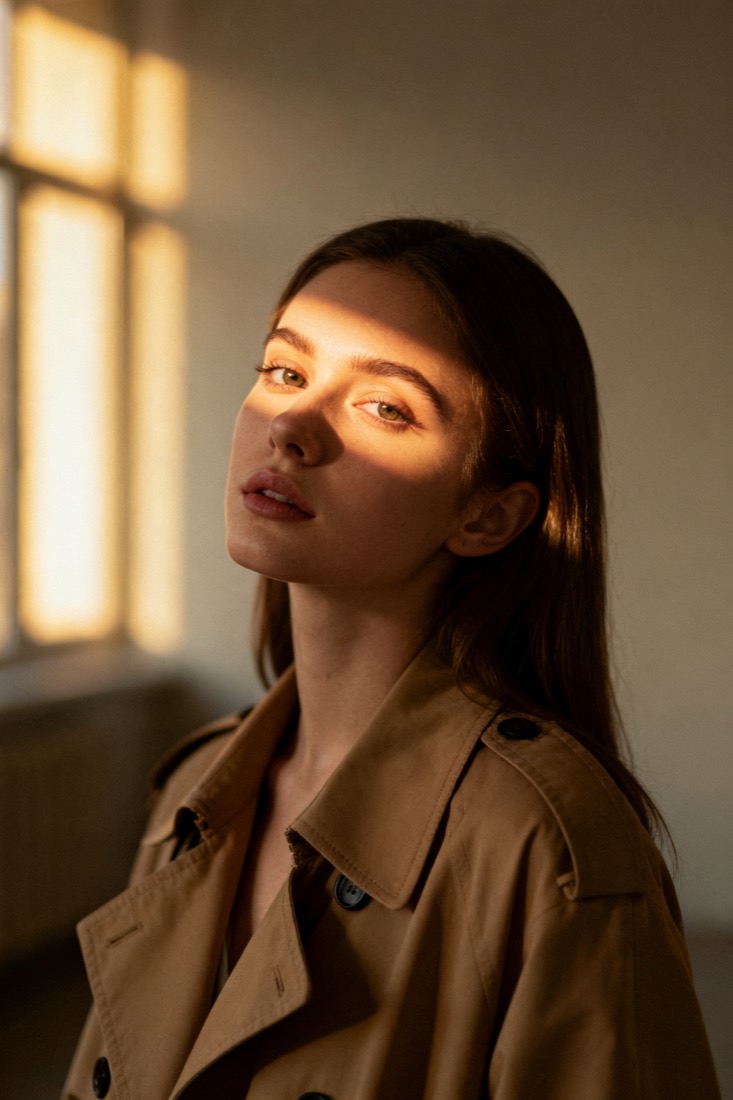
A cinematic waist-up portrait of a young woman in a beige trench coat, lit by soft window light, muted earth tones, shallow depth of field, shot on an 85mm lens.
Subject
woman, beige trench coat
Composition
waist-up, centered
Lighting
soft window light
Style
cinematic, muted
Camera
85mm, f/1.8
Negative
blur, extra fingers
You move fast and you need visuals that match a vibe, not visuals that eat an afternoon. PixToPrompt turns any reference image — a thumbnail, a moodboard pin, a frame you screenshotted — into a clean, copy-paste prompt, so you can recreate a style on demand and put your own subject in it.
Match a trending style in seconds
See a thumbnail or cover that is getting clicks? Drop it in and read the prompt behind it, then send that prompt to whatever model you already use. Reading a prompt is free and needs no sign-up.
From a screenshot to a prompt
Upload the image or paste a URL and PixToPrompt returns the working fields — subject, lighting, camera and composition — already assembled into a prompt you can paste straight into Midjourney, Flux, Gemini or DALL·E.
Drop your own subject in
The look is a template, not a copy. Swap the subject line for your face, your product or your scene and keep the lighting and framing that made the original pop — so it is recognisably the trend, but unmistakably yours.
One reference, every model and format
The same look needs different wording per model and per slot, so one analysis reformats into every version you ship.
Thumbnails that pop
Push contrast, bold subject framing and a punchy palette for the 16:9 thumbnail that has to read at a glance on a feed.
On-brand social posts
Reuse the same palette and mood across a square post or a vertical story, so a week of content looks like it came from one creator, not five.
creator workflow
From reference to repeatable look.
Read the prompt behind any image, switch it to your model's format, and confirm the result before you commit.
Match a reference
Turn a screenshot or pin into a working image-to-prompt result in seconds.
Stay on-brand
Lock a recognizable style and reuse it across thumbnails and posts.
Prove it works
See a before/after recreation so you never publish a prompt that misses.
How content creators use it
- Screenshot — grab the thumbnail, pin or frame whose look you want.
- Read the prompt — drop it in and get the subject, lighting and camera fields.
- Swap and verify — replace the subject with yours, then generate to check it lands before you publish.
Content creator questions
Is it free? Reading the prompt behind any image is free with no account. Generating a new image is the paid layer, since that runs on GPUs.
Do you store my images? No — uploads are processed to build the prompt and then deleted; they are never used for training.
Can I use the results commercially? Yes — the prompts and any images you generate are yours; check the destination model's own output terms.
Turn your next reference into a prompt.
Reading a prompt is free and instant. Generating new images from it is the paid layer when you're ready.